


Surveys On The Go: Earn Cash
4.468.11K Reviews
App Specs
- Version
- 3.6.0
- Updated On
- License
- Free
- Downloads
- 5,000,000+
- Developer
- MFour Data Research, Inc.
- Categories
- Lifestyle
- Platform
- Android, iOS
Screenshots

 Analysis by AppCompare
In a shared household, a survey app can look like an easy way to fill the small gaps in everyone’s day. I’d treat Surveys On The Go as a personal side activity, though, not a family account or a dependable source of household income. Surveys are matched to individuals, and answers are meant to reflect the account holder’s own experiences and views. Passing one phone around and letting several people answer under one profile would blur that distinction and could make responses less useful.
A good fit for small pockets of free time
The app makes the most sense for someone who is comfortable answering questions while waiting for an appointment, sitting through a commute as a passenger, or taking a quiet break at home. I wouldn’t open it expecting a steady stream of work. Survey availability can vary, and an invitation is an opportunity rather than a promise that there will always be something to complete.
That uncertainty changes how I’d use it: check when a spare moment appears, then decide whether the available task suits the time and attention I have. If I’m about to start dinner or need to leave in a few minutes, I’d skip a longer questionnaire rather than begin and rush through it. Survey answers are more useful when they’re considered, and a hurried session is rarely a good trade for a small reward.
What a realistic household routine looks like
Imagine one adult checking the app during a lunch break, while another family member is using the shared tablet for something else. The practical arrangement is simple: each person who wants to participate should use their own account on a device they can access, rather than taking turns inside one login. A shared device may be convenient, but it is worth signing out or otherwise keeping account access distinct when another person uses it.
I’d also avoid making survey time a family chore. If someone happens to be interested in a questionnaire, they can answer it themselves; asking a relative to supply answers for the account holder defeats the point of collecting personal opinions. For a household that wants a group activity, a quiz or game designed for shared play is a better match than an individual research survey.
Setup, privacy, and account boundaries
Registration asks for personal details such as age, gender, and location so the app can match surveys to a respondent. That is a useful reminder to pause before signing up: the app is a poor fit for anyone who wants to avoid sharing demographic information for research matching. I’d use accurate details rather than guessing, because inconsistent information can make a profile less useful for finding relevant surveys.
On a device used by more than one person, keep the account holder’s details and answers private. Don’t let a child or guest complete a survey simply because the phone is nearby, and don’t leave a profile open where another person could submit responses by mistake. These are ordinary shared-device habits, not special family controls; the safest approach is to treat the account as belonging to one respondent.
Worth Reading Before You Choose

EA SPORTS FC Mobile 26 Is a Bigger Football Game, but It Takes Time

Flipboard Shows What News Apps Must Do Beyond the Feed

Switching to Android Auto Means Rethinking Your Driving Routine

Google Calendar Makes a Crowded Week Easier to Manage

Ludo King Makes the Most of the Minutes Between Plans

Baby Panda World Brings Quick Play to Modern Phones, but Its Game Library Feels Busy
Age context and household expectations
The app is rated Everyone, but that content label should not be confused with a recommendation that every child create an account or answer research questions. The survey profile involves personal information, and some topics may be more appropriate for an adult to assess before participating. In a household with children, I’d keep the account with the adult who registered and avoid letting a child answer in their place.
It also helps to set expectations with other adults at home. This is not a shared wallet that automatically pools everyone’s activity, and I wouldn’t count prospective survey earnings toward bills or a fixed savings goal. Think of any rewards as incidental money for the person who completes eligible surveys, with the time spent and the availability of invitations determining whether it feels worthwhile.
Where it sits beside other ways to earn
Compared with a general rewards app that asks users to collect points through several activities, this one is focused on survey participation and presents itself around cash rewards. That direct approach is appealing if I only want to answer questions, but it also means there is less reason to open it when no suitable survey is available. A cashback service may be more useful for someone already making eligible purchases, while a task marketplace may suit someone seeking more varied work and willing to take on more involved tasks.
For me, the key comparison is not which app claims the biggest return; it is whether the activity fits naturally into time I already have. If you need predictable earnings, a paid shift or freelance work is a more sensible choice. If you want a low-commitment option for occasional downtime and accept that opportunities can be uneven, survey-taking may be worth trying.
Getting Started with Surveys On The Go
The download and installation process is super straightforward. You can find it on both the Google Play Store and Apple’s App Store. Once installed, you’ll need to create an account. It’s a quick setup, requiring some basic information like your age, gender, and location to match you with relevant surveys.
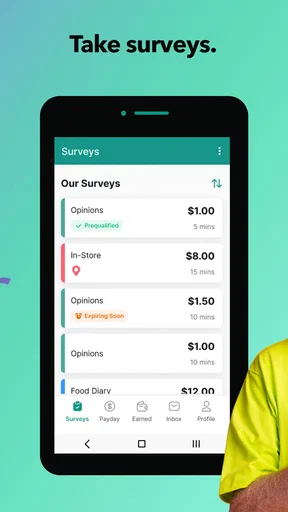
Right off the bat, I noticed the interface was clean and easy to navigate. No clutter or unnecessary features – just a simple, functional design that focuses on surveys. Surveys On The Go feels like it knows what it’s doing, and it gets straight to the point.
How It Works
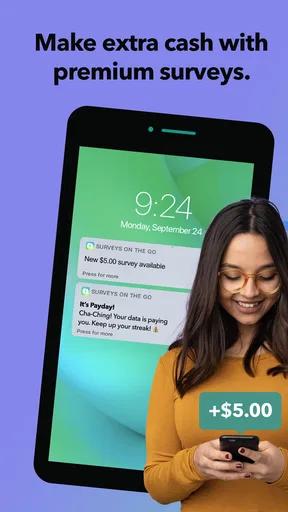
The app sends you notifications when a new survey is available. You can also refresh the main screen to check for updates. The surveys range from quick 5-minute questionnaires to more detailed 20-minute ones. The payout varies accordingly, with longer surveys offering more substantial rewards.
One thing I appreciated was the transparency. Before starting a survey, you get a clear idea of how long it will take and how much it pays. No surprises here! You can decide if it’s worth your time or not.
Real Money Rewards
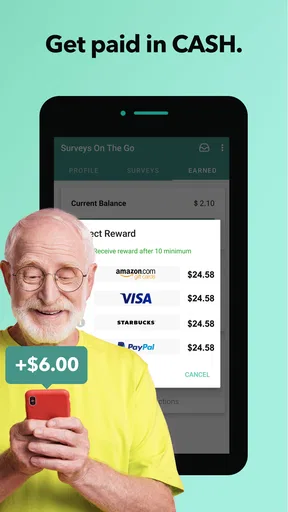
Let’s talk about the rewards because, let’s face it, that’s why we’re all here! You earn cash for every completed survey. The app directly credits your account, and once you reach a minimum threshold (usually around $10), you can cash out via PayPal or choose a gift card.
The cash-out process is smooth and reliable. I personally opted for PayPal, and the funds hit my account without any hitches. It’s refreshing to see an app that actually delivers on its promises.
Types of Surveys
The surveys cover a wide range of topics. From opinions on new products to feedback on political issues, there’s something for everyone. This variety keeps things interesting and ensures you’re not stuck answering the same questions repeatedly.
I found the surveys to be quite engaging. They’re usually well-structured, and some even come with interactive elements that make the process a bit more fun. Plus, your answers contribute to market research, so it feels good to know your voice is being heard.
User Experience
The app’s performance is solid. I didn’t experience any crashes or slowdowns, which is always a big plus. The notifications are timely but not intrusive, and the app doesn’t drain your phone's battery like some other apps tend to do.
One thing I would love to see in future updates is a more personalized dashboard. While the current layout is functional, having a bit more insight into your earnings and survey history could enhance the user experience.
Who should give it a try
My recommendation is for adults who enjoy giving considered opinions and don’t mind the occasional quiet stretch without a new survey. The app is free, and MFour Data Research, Inc. has maintained it as a lifestyle app since its release on October 12, 2011. Its current version is 3.0.1, and it has an average rating of 4.3 from around 129,000 ratings, alongside more than 5 million installs. Those figures suggest it has reached a broad audience, but they don’t change the basic trade-off: the value depends on whether the available surveys suit you.
I’d skip it if you dislike sharing demographic details, find questionnaires tedious, or need a predictable return for a set amount of time. It is also not ideal for someone hoping to involve several household members through a single profile. The app is free and rated for Everyone, but suitability still depends on the respondent and the information they’re comfortable providing.
Make each session more worthwhile
A useful habit is to read the estimated duration and reward before starting, then compare that commitment with the time you actually have. I’d also take a moment to answer carefully and consistently instead of racing through just to finish. For surveys that ask about habits or purchases, thinking about the relevant period before tapping through can help avoid casual guesses.
Notifications can help surface invitations, but I wouldn’t let them dictate the day. If alerts interrupt work or family time, turning them off in the phone’s notification settings and checking the app when convenient is a reasonable way to keep the activity in its place. On a shared phone, that also prevents another person from mistaking an alert for something they should open and complete.
One limitation of survey apps in general is that a respondent may not qualify for every questionnaire, even when the subject seems relevant. I’d treat a screening step or an unavailable survey as part of the category rather than a personal rejection, and avoid planning around any single invitation. This makes the experience less frustrating and keeps the app from taking over spare time.
Choosing it for the right reason
The clearest question to ask before installing is whether you’d enjoy answering questions even when the reward is modest. If the only motivation is maximizing hourly income, other work is likely a better use of your attention. If you like sharing opinions and can fit occasional surveys into waiting time, the focused format is easier to understand than an app that mixes questionnaires with shopping offers, games, or other reward tasks.
For a household, I’d keep the arrangement modest and individual: one person owns the account, makes their own choices about notifications and participation, and decides how to use any rewards they earn. That avoids arguments over who answered, who gets credit, or whether a shared device has been left signed in. It’s a small distinction, but it makes a personal survey app much easier to manage at home.
Final Thoughts
Overall, Surveys On The Go delivers on its promise of making survey-taking easy and rewarding. It’s not going to replace your day job, but it’s a nice way to earn a bit of extra cash during your downtime. The app is user-friendly, reliable, and actually pays out, which is more than can be said for some of its competitors.
If you’re looking for a hassle-free way to make some pocket change, give it a shot. It’s a straightforward approach to earning, and who knows, you might even enjoy sharing your opinion along the way!
Pros
- User-friendly interface and navigation.
- Wide variety of survey topics available.
- Payouts via PayPal or gift cards.
- Notifications for new survey opportunities.
- No intrusive ads while using the app.
Cons
- Limited surveys available in some regions.
- Requires stable internet connection.
- Occasional app crashes reported.
- Minimum payout threshold can be high.
- Survey disqualifications can occur.
FAQs for Surveys On The Go: Earn Cash
What is Surveys On The Go and how does it work?
Surveys On The Go is a mobile application designed to provide users with paid survey opportunities. Users can download the app, create a profile, and start receiving notifications for available surveys. Once a survey is completed, users earn cash rewards, which can be redeemed through various payment options such as PayPal or gift cards.
Is Surveys On The Go safe to use?
Yes, Surveys On The Go is a legitimate and secure app. It is developed by a reputable company that values user privacy and data security. The app requires minimal personal information and uses encryption to protect data. Reviews from users generally highlight its reliability and safe payment processes.
How much money can I make with Surveys On The Go?
Earnings with Surveys On The Go vary depending on the number and type of surveys available. Each survey pays differently, typically ranging from $0.50 to $5. Some specialized surveys may offer higher rewards. It's a good way to earn some extra cash, but it won’t replace a full-time income.
What platforms is Surveys On The Go available on?
Surveys On The Go is available for both Android and iOS devices. Users can download the app from the Google Play Store for Android or the Apple App Store for iOS. Ensure your device meets the minimum requirements for installation and optimal performance.
Are there any age or location restrictions for using Surveys On The Go?
Yes, users must be at least 13 years old to use Surveys On The Go, although some surveys may require participants to be 18 or older. The app is available in the United States, and survey availability can vary based on your geographic location. Check the app for specific eligibility requirements.


